
Directory › Development › claude-auto-handoff
> GEM DEVELOPMENT · PERSONAL AGENTS
claude-auto-handoff
by Alex Hillman
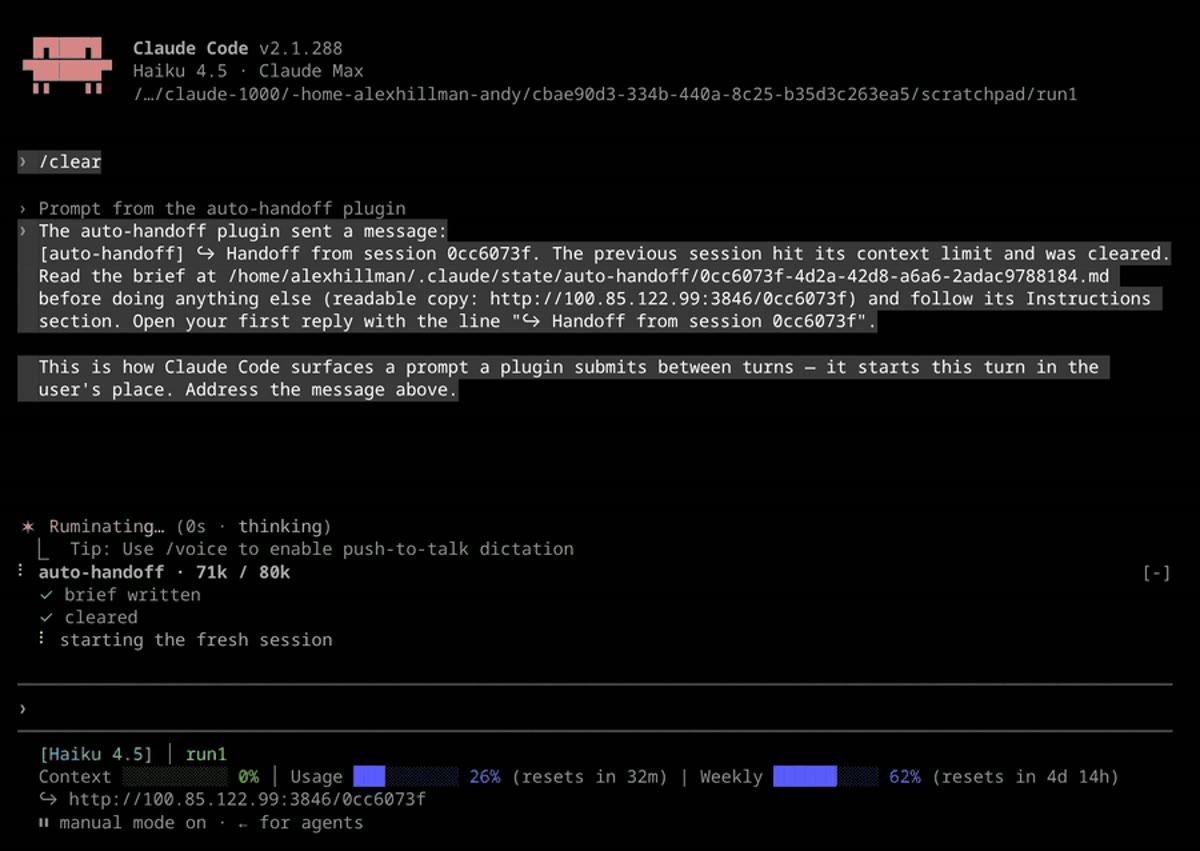
A Claude Code plugin that writes a summary of the session at the threshold, then carries on in a clean session.
View the project →What it does
- At the context threshold, a structured summary is written (work in progress, decisions, next step)
- The session is cleared with /clear, and the new one reads the summary
- The code is short and public (MIT license)
! Not tested on our sessions: no token saving measured. The summary is written by Haiku, so it also uses tokens. The default threshold is 160,000 tokens. The summaries can be served on Tailscale without a password: turn that server off (empty "viewer" setting) if you don't want to share them. Read the code before installing.
Install it
Requirements: Claude Code with mods. To read the summaries from outside your machine: Tailscale.
git clone https://github.com/alexknowshtml/claude-auto-handoff.git ~/claude-auto-handoffclaude --plugin-dir ~/claude-auto-handoff
The prompt for your agent
Paste it into your coding agent: it checks the requirements and installs it for you.
Install claude-auto-handoff (https://github.com/alexknowshtml/claude-auto-handoff) on my machine.
1. Check the requirements: Claude Code with mods. To read the summaries from outside your machine: Tailscale. If anything is missing, tell me before installing anything.
2. Follow the official method:
- Clone the repository into your home folder: git clone https://github.com/alexknowshtml/claude-auto-handoff.git ~/claude-auto-handoff
- Start Claude Code with the plugin: claude --plugin-dir ~/claude-auto-handoff
3. Check that it works, then explain how to launch it and where to start.
Always review what your agent is about to run, especially install commands.