
Directory › Research & monitoring › DigUp
> GEM RESEARCH & MONITORING · PRODUCTIVITY & DOCS · LOCAL AI
DigUp
by ARahim3
Find any file just by describing it.
View on GitHub →What it does
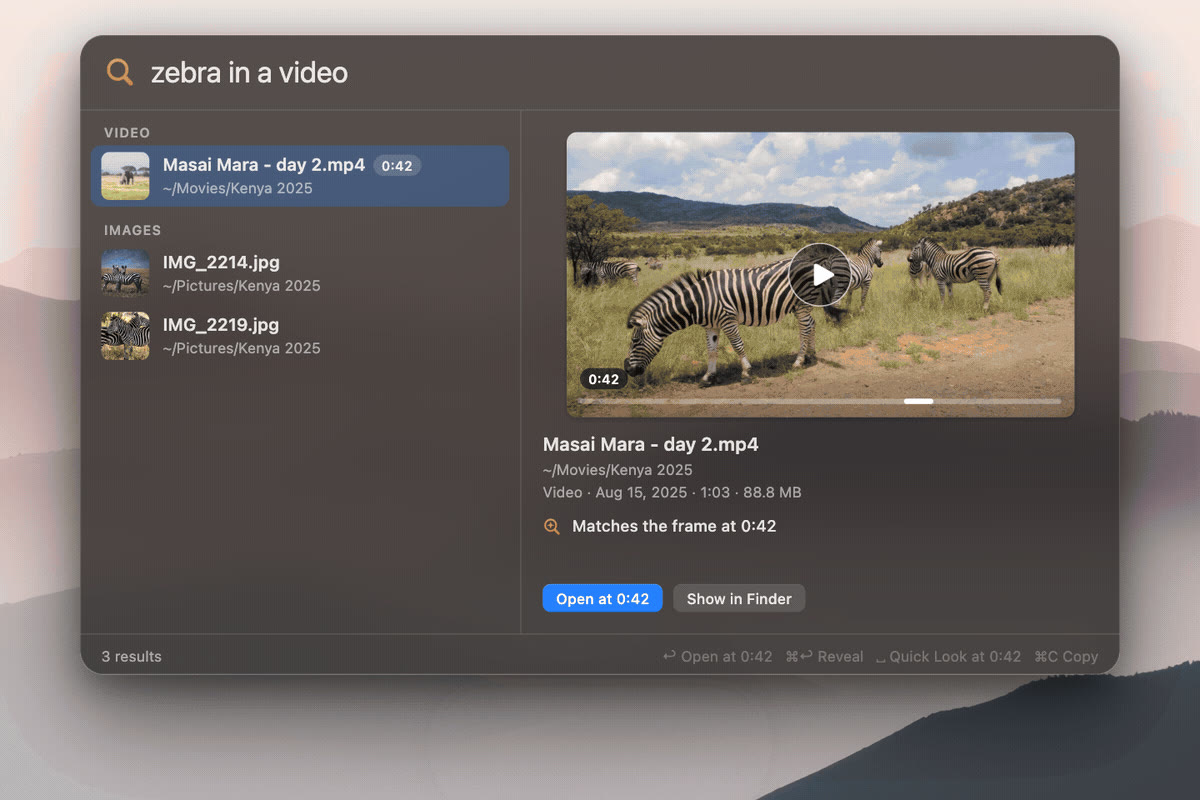
- “zebra in a video” opens the clip at the right moment
- Text, PDFs, photos, audio, video… and even your code
- 100% local, powered by Google's EmbeddingGemma 2
Install it
Requirements: Apple Silicon Mac, macOS 14 or later. The model (865 MB) downloads on first launch.
With Homebrew
brew install --cask arahim3/tap/digupOr download the .dmg
https://github.com/ARahim3/DigUp/releases/latest

The prompt for your agent
Paste it into your coding agent: it checks the requirements and installs it for you.
Claude CodeCodexCursorGemini CLIopencode
Prompt
Install the DigUp app (https://github.com/ARahim3/DigUp) on my Mac.
1. Check that this is an Apple Silicon Mac running macOS 14 or later; if not, stop and tell me.
2. Check that Homebrew is installed; if it isn't, ask me before installing it.
3. Install DigUp with: brew install --cask arahim3/tap/digup
4. Open the app, then remind me how to choose the folders to index and that ⇧⌘Space starts a search.
Always review what your agent is about to run, especially install commands.